
Many Power Apps applications work perfectly during the first stages of development.
Everything feels fast.
Everything feels simple.
But over time:
- the app becomes slow
- logic starts breaking
- scaling becomes difficult
- maintenance becomes painful
And in most cases:
It’s not Power Apps itself causing the problem.
It’s the architecture behind the app.
In this article, you’ll learn the 3 most common Power Apps mistakes that negatively impact performance, maintainability, and scalability—and how to fix them using better data practices, optimized queries, and cleaner architecture.
1. Poor Data Quality Causes Power Apps Problems
One of the biggest Power Apps problems starts with poor data quality.
At first, allowing users to freely type values into text inputs seems flexible.
But over time, this creates fragmented and inconsistent data.
The Problem
For example:
- "Company A"
- "Company A/S"
- "Company A A.S."
These may represent the same company.
But technically, they are completely different values.
👉 This creates fragmented data.

The same issue happens with placeholder values like:
- "N/A"
- "na"
- "-"
- empty strings
This creates inconsistent logic across the application.

Why It Matters
Power Apps logic depends heavily on clean and standardized data.
When data becomes inconsistent:
- filters stop working correctly
- conditions fail unexpectedly
- reports become unreliable
- automations break
- integrations become difficult
This becomes especially problematic in enterprise Power Platform solutions where multiple systems depend on the same data.
The Fix
Instead of relying on uncontrolled text input:
✔ Use dropdowns whenever possible
✔ Standardize allowed values
✔ Store proper NULL values instead of fake placeholders
✔ Validate data before saving
✔ Keep naming conventions consistent
💡 Key Insight
Your app is only as good as your data.
Clean data creates stable applications.
Messy data creates fragile architecture.
2. LookUp Inside Galleries Hurts Power Apps Performance
One of the most common Power Apps performance problems comes from inefficient data retrieval.
Especially inside galleries.
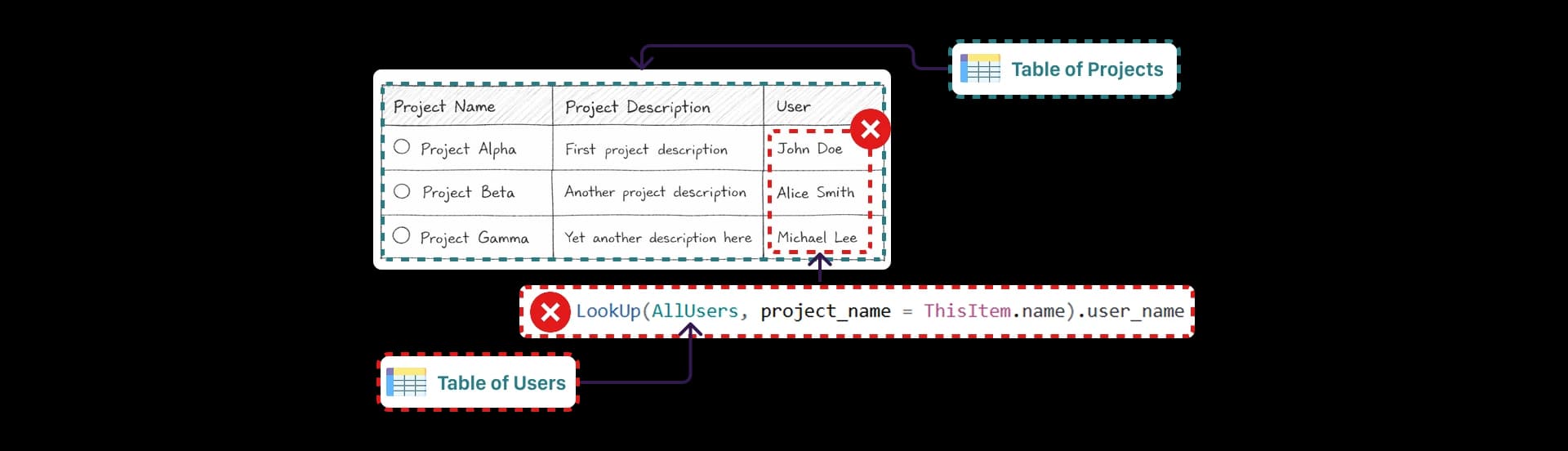
The Problem
A very common pattern looks like this:
LookUp(
    Customers,
    CustomerId = ThisItem.CustomerId
).Name
This may seem harmless.
But when used inside a gallery:
👉 the query runs for every single row.
Why It Matters
More rows means:
more queries more connector calls more processing slower rendering
With small datasets, the issue may not be visible.
But once the app grows:
500 rows 1,000 rows 5,000 rows
👉 performance starts collapsing.
This is extremely common in enterprise Power Apps applications connected to SharePoint, SQL, or Dataverse.
The Fix
Instead of performing per-row queries in the UI:
✔ Join data before loading it into the app
✔ Use SQL views or backend APIs
✔ Pre-process datasets
✔ Minimize repeated queries
✔ Load only required data
Better architecture always beats repeated client-side queries.

💡 Key insight:
Performance is not about connectors. It’s about how you use them.
Most performance problems are architectural problems.
3. Power Apps Should Not Handle Backend Logic
This is one of the biggest architectural mistakes in Power Platform projects.

The Problem
Many developers push too much logic directly into Power Apps.
For example:
complex transformations heavy calculations large data processing business logic orchestration
All directly inside the app.
This creates apps that are:
❌ difficult to maintain
❌ slow to load
❌ difficult to scale
❌ fragile over time

Why It Matters
Power Apps is primarily a frontend platform.
It is designed for:
- user interaction
- forms
- UI logic
- workflows
- business applications
It is not designed to replace a backend architecture.
When Power Apps becomes responsible for heavy processing:
- performance drops
- formulas become unreadable
- debugging becomes difficult
- scaling becomes problematic
The Fix
Move heavy logic outside the app.
✔ Use SQL stored procedures
✔ Use SQL views
✔ Use Azure Functions
✔ Use APIs for transformations
✔ Keep Power Apps focused on UI
This creates significantly cleaner and more scalable applications.

💡 Key insight:
Power Apps is a frontend. Treat it like one.
Good architecture matters more than complex formulas.
Why These Power Apps Mistakes Matter
All three problems are connected.
Bad data creates broken logic.
Poor queries create slow performance.
Weak architecture creates unscalable applications.
And these issues compound over time as the app grows.
This becomes especially visible in enterprise Power Platform solutions with:
- large datasets
- multiple integrations
- growing business logic
- multiple developers
- long-term maintenance requirements
Best Practices for Healthy Power Apps
To build scalable and maintainable Power Apps applications:
✔ Keep data standardized
✔ Avoid repeated queries inside galleries
✔ Move heavy processing to the backend
✔ Centralize reusable configuration
✔ Optimize data loading early
✔ Reduce duplicated logic
✔ Design with scalability in mind
Small architectural improvements create massive long-term benefits.
You can also improve maintainability by using centralized configuration with App.Formulas:
👉 How to Centralize Configuration in Power Apps
Final Thoughts
Most Power Apps applications do not fail because of the platform itself.
They fail because of:
- messy data
- inefficient queries
- poor architecture
The good news is:
These problems are preventable.
If you focus on:
- clean data
- optimized queries
- scalable architecture
your apps will become:
✅ faster
✅ cleaner
✅ easier to maintain
✅ significantly more scalable
The Rule to Remember
Your app is only as good as:
- your data
- your queries
- your architecture
If you fix these three things, your Power Apps applications will perform dramatically better over time.