
Power Automate makes it incredibly easy to build automations.
But building enterprise-ready flows is a completely different challenge.
One thing becomes obvious very quickly in production environments:
A flow without proper error handling is not an enterprise-ready flow.
Many Power Automate flows work perfectly during development.
Then suddenly in production:
- APIs time out
- permissions change
- connectors fail
- external systems become unavailable
- invalid data enters the flow
- unexpected edge cases appear
And without structured error handling:
❌ failures become difficult to diagnose
❌ flows fail silently
❌ support becomes painful
❌ monitoring becomes unreliable
❌ maintenance becomes expensive
That is why enterprise Power Automate solutions require proper error handling architecture.
In this article, you’ll learn how to build scalable and maintainable Power Automate error handling using Try Catch Finally patterns, Scopes, child flows, and centralized logging.
Why Error Handling Matters in Power Automate
A surprising number of Power Automate flows are designed only for the “happy path”.
Meaning:
👉 they assume everything works perfectly.
But real-world enterprise systems are unpredictable.
External dependencies fail constantly:
- REST APIs
- SharePoint
- Dataverse
- SQL connections
- Azure services
- third-party systems
Without proper error handling:
- users do not know what failed
- administrators cannot troubleshoot issues
- errors disappear without context
- support teams lose visibility
This creates fragile automation solutions.
Enterprise automation requires predictable failure handling.
The Problem with Basic Power Automate Flows
Many beginner Power Automate flows look like this:
Trigger
↓
Action 1
↓
Action 2
↓
Action 3
This works until something fails.
Then:
- the flow stops immediately
- later actions never execute
- cleanup logic is skipped
- logging is inconsistent
- notifications may never happen
This architecture does not scale well.
Enterprise Pattern: Try Catch Finally in Power Automate
Traditional programming languages support:
- Try
- Catch
- Finally
Power Automate does not provide native Try Catch blocks.
But we can emulate the exact same architecture using Scopes.
This is one of the most important enterprise Power Automate design patterns.
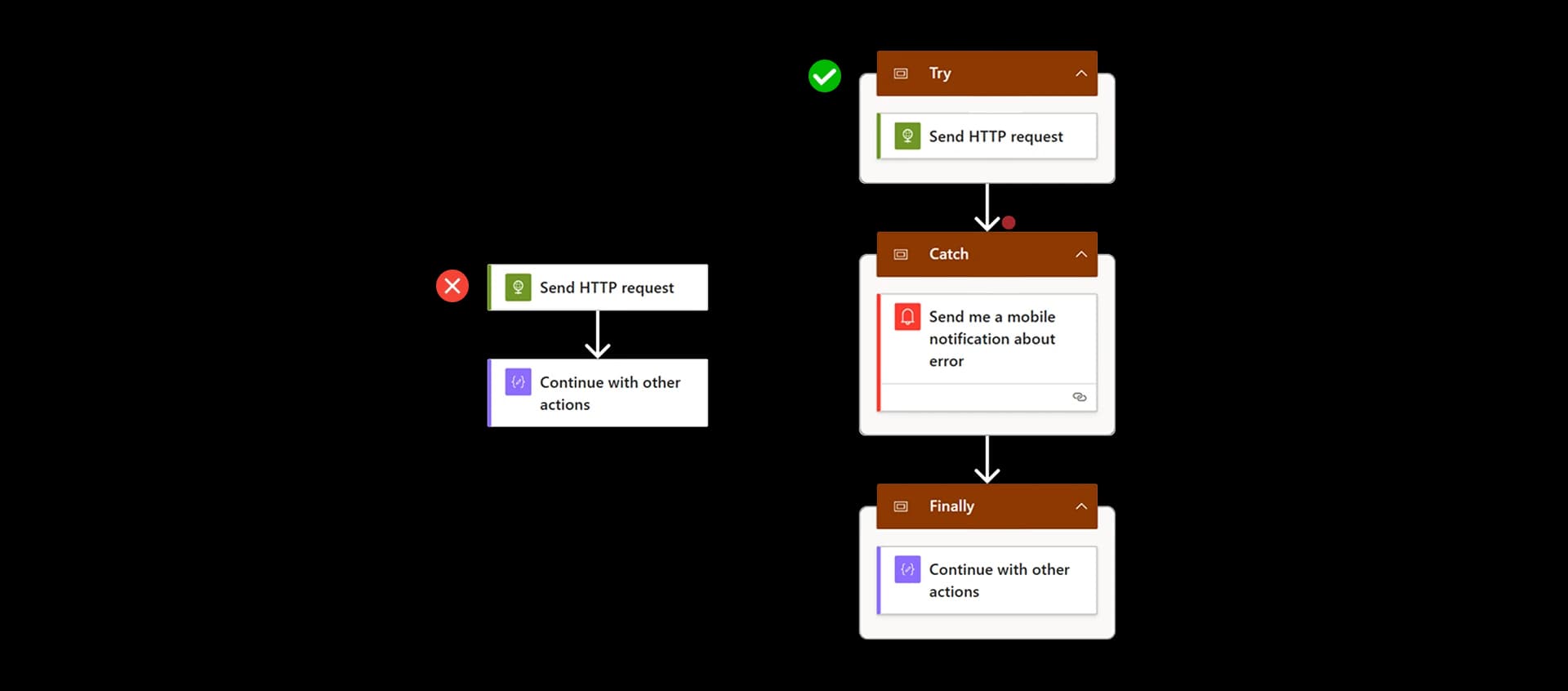
Enterprise Pattern: Try Catch Finally in Power Automate
| Programming Concept | Power Automate Equivalent |
|---|---|
| Try | Scope (Main logic) |
| Catch | Scope (Runs on failure) |
| Finally | Scope (Always runs) |
This creates:
- predictable execution
- cleaner architecture
- easier debugging
- better maintainability
Step 1: Create the Try Scope
The Try scope contains your main business logic.
This is where the actual automation happens.
Typical actions include:
- calling APIs
- processing files
- updating SharePoint
- writing to Dataverse
- executing SQL queries
- triggering child flows
- processing approvals
The goal is simple:
👉 keep the main logic isolated inside one Scope.
Best Practices for the Try Scope
When designing the Try scope:
✅ keep it focused
✅ avoid deep nesting
✅ validate inputs early
✅ fail fast on invalid conditions
✅ group related logic together
This makes troubleshooting significantly easier later.
Step 2: Create the Catch Scope
The Catch scope handles errors.
It should execute only when the Try scope fails.
This is the equivalent of a traditional programming Catch block.
Configure Run After in Power Automate
To make the Catch scope work properly:
Click the three dots on the Catch Scope Select:
Configure run after
Enable:
- has failed
- has timed out
- has been skipped
This tells Power Automate:
👉 run the Catch scope only when the Try scope does not complete successfully.
What Should the Catch Scope Do?
The Catch scope should focus on:
- capturing errors
- logging failures
- notifying administrators
- triggering monitoring logic
- updating status fields
Typical actions include:
- sending Teams notifications
- sending emails
- logging into Dataverse
- calling logging APIs
- triggering centralized error handling child flows
Step 3: Create the Finally Scope
The Finally scope should always run.
Regardless of:
- success
- failure
- timeout
This is the equivalent of:
finally {}
in traditional programming languages.
What Belongs in the Finally Scope?
The Finally scope is ideal for:
- cleanup logic
- releasing resources
- updating status fields
- writing audit logs
- resetting temporary states
- final notifications
This ensures your flow always exits cleanly.
Recommended Enterprise Flow Structure
A clean enterprise Power Automate architecture usually looks like this:
Try Scope
↓
Catch Scope (on failure)
↓
Finally Scope (always runs)
This pattern creates:
- predictable execution
- easier maintenance
- cleaner troubleshooting
- enterprise-grade reliability
Centralized Error Handling with Child Flows
One of the biggest mistakes in Power Automate is duplicating error handling logic across multiple flows.
Instead:
👉 centralize it using child flows.
This is an extremely powerful enterprise pattern.
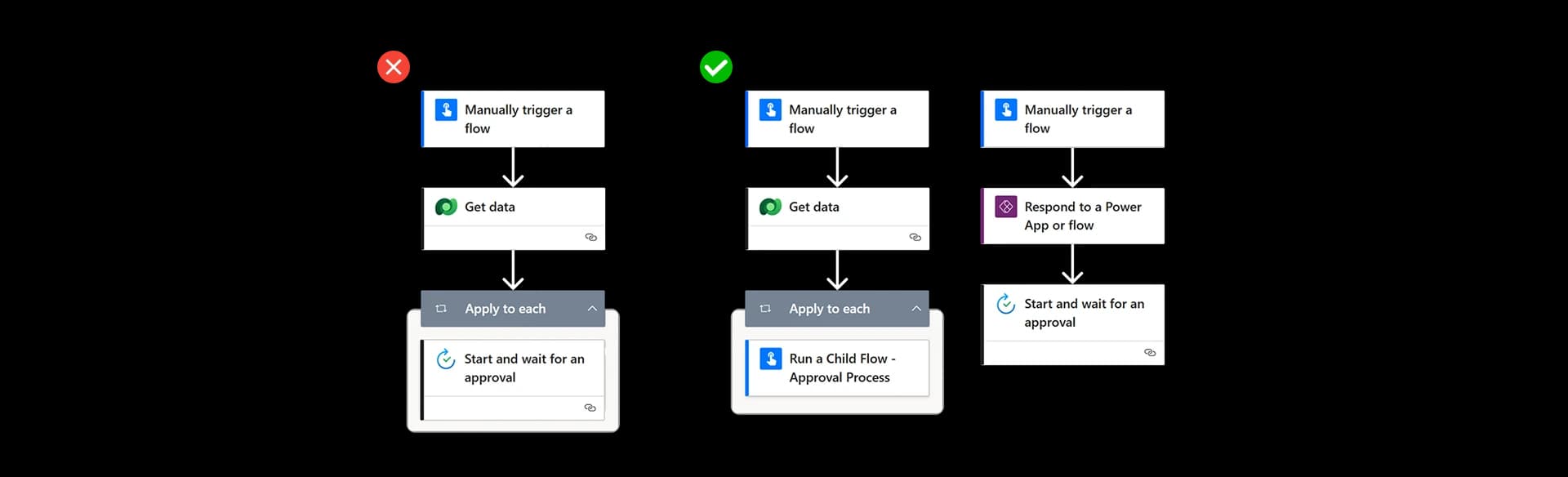
Why Child Flows Improve Error Handling
Without child flows:
- every flow has duplicated logging logic
- maintenance becomes painful
- notification formatting becomes inconsistent
- monitoring becomes fragmented
With child flows:
✅ centralized maintenance
✅ reusable architecture
✅ standardized logging
✅ cleaner flows
✅ consistent notifications
What Information Should Be Logged?
Good error handling requires meaningful diagnostics.
Useful information includes:
- flow name
- action name
- error message
- timestamp
- environment
- run ID
- user context
- correlation IDs
This makes troubleshooting dramatically easier.
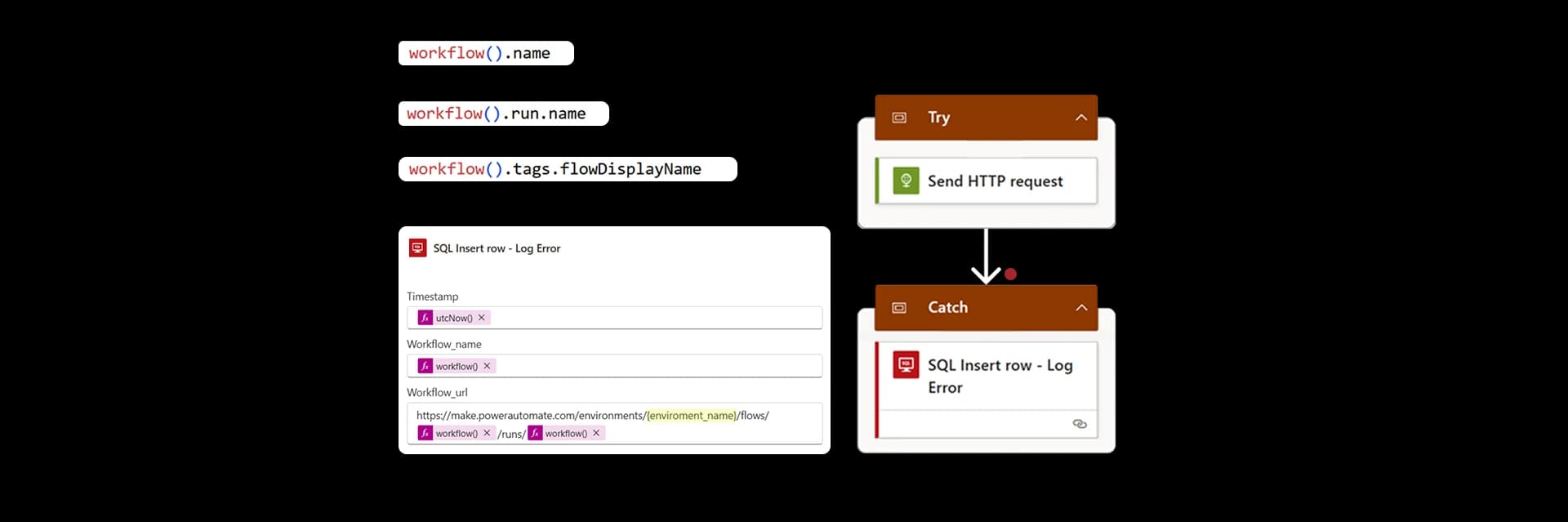
Useful Power Automate Error Expressions
Power Automate provides several useful expressions for diagnostics.
Examples:
workflow()?.name
workflow()?.run?.name
actions('ActionName')?.error?.message
These expressions help create actionable logs instead of generic failure messages.
Real-World Enterprise Scenarios
This architecture becomes extremely valuable in enterprise automations like:
- approval workflows
- ERP integrations
- API orchestration
- HR onboarding
- financial processing
- document automation
- enterprise notifications
- multi-system synchronization
These scenarios require reliability.
And reliability requires structured error handling.
Common Power Automate Error Handling Mistakes
Some of the most common mistakes include:
❌ no Scopes
❌ silent failures
❌ duplicated logging logic
❌ missing cleanup steps
❌ poor diagnostics
❌ deeply nested conditions
❌ no centralized monitoring
These patterns create fragile flows that become difficult to maintain over time.
Best Practices for Enterprise Power Automate Flows
When building enterprise-grade Power Automate solutions, I recommend these best practices:
- always use Scopes
- separate Try Catch Finally clearly
- centralize error logging
- capture meaningful diagnostics
- use child flows for reuse
- avoid silent failures
- keep flows modular
- fail fast when validation fails
- monitor critical automations
Good architecture matters.
Why This Architecture Scales Better
As Power Automate environments grow:
- flows increase
- integrations increase
- dependencies increase
- failure points increase
Without structured patterns, maintenance becomes chaotic.
Try Catch Finally architecture creates:
- predictable behavior
- reusable standards
- scalable automation governance
This is one of the biggest differences between:
- small automations
- enterprise automation platforms
Final Thoughts
Power Automate is capable of enterprise-grade automation.
But enterprise quality does not happen automatically.
It comes from architecture decisions.
Structured error handling is one of the most important patterns you can implement in Power Automate.
It transforms fragile flows into:
- reliable automations
- maintainable solutions
- scalable enterprise workflows
If you truly want to master Power Automate:
👉 error handling is not optional 👉 it is foundational
The Rule to Remember
If your flow only handles success:
👉 your architecture is incomplete.
Enterprise flows must also handle failure.