
3 Mistakes That Kill Power Apps Performance
Many Power Apps work perfectly… at the beginning.
Then suddenly:
- they become slow
- logic starts breaking
- scaling becomes impossible
And it’s almost never Power Apps itself.
It’s how the app is built.
In this article, you’ll learn the 3 most common mistakes that cause these issues—and how to fix them.
1. Messy Data = Broken App
One of the biggest problems starts with data quality.
The Problem
When you allow free text input:
- “Company A”
- “Company A/S”
- “Company A A.S.”
👉 You create fragmented data

And even worse:
- "N/A"
- "na"
- empty values
👉 You create inconsistent logic

Why It Matters
Your app logic depends on data being consistent.
If it's not:
- filters break
- conditions fail
- reports become unreliable
The Fix
✔ Use dropdowns instead of text inputs
✔ Standardize values
✔ Store NULL instead of fake values like "N/A"
💡 Key insight:
Your app is only as good as your data.
2. LookUp in Gallery = Slow App
Performance issues often come from how data is retrieved.
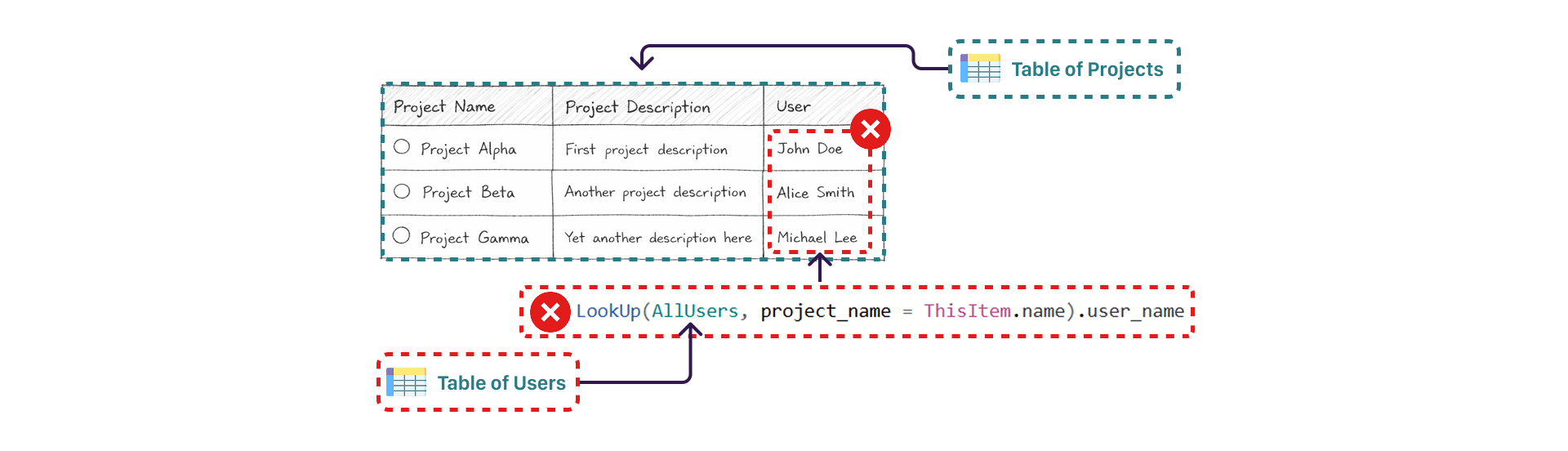
The Problem
Using LookUp() inside a gallery 👉 This runs for every row.
Why It Matters
- More rows = more queries
- More queries = slower app
It might work with 10 items…
But with 1,000+? 👉 It becomes unusable.
The Fix
✔ Join your data before loading it into the app ✔ Use a pre-processed dataset (SQL view, API, etc.) ✔ Avoid per-row queries in UI

💡 Key insight:
Performance is not about connectors. It’s about how you use them.
3. Power Apps ≠ Backend
This is one of the most common architectural mistakes.

The Problem
Handling logic directly in Power Apps:

👉 Complex 👉 Slow 👉 Hard to maintain
Why It Matters
Power Apps is not designed to handle heavy data logic.
When you treat it like a backend:
- performance drops
- logic becomes messy
- scaling becomes difficult
The Fix
✔ Move logic to SQL (stored procedures, views) ✔ Handle transformations in backend ✔ Keep Power Apps focused on UI

💡 Key insight:
Power Apps is a frontend. Treat it like one.
Why These 3 Mistakes Matter
All three problems are connected:
- Bad data → broken logic
- Poor queries → slow performance
- Wrong architecture → unscalable apps
Final Thoughts
Most Power Apps don’t fail because of the platform.
They fail because of:
- messy data
- inefficient queries
- poor architecture
The Rule to Remember
Your app is only as good as:
- your data
- your queries
- your architecture
If you fix these three things, your apps will be faster, cleaner, and scalable.